Are you worried that your digital hygrometer in your gun safe isn’t giving accurate readings? Keeping the right humidity level is crucial to protect your firearms from rust and damage.
But sometimes, your hygrometer might need a quick reset to work properly again. You’ll learn simple, step-by-step instructions on how to reset your digital hygrometer quickly and easily. By the end, you’ll feel confident in maintaining the perfect environment inside your gun safe, ensuring your valuable firearms stay safe and in top condition.
Keep reading to find out how!
Purpose Of A Digital Hygrometer
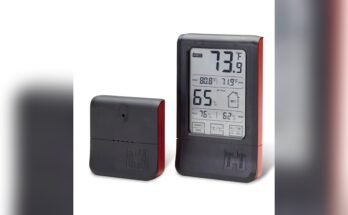
A digital hygrometer measures the moisture level inside your gun safe. It helps keep your guns and gear safe from rust and damage. Moisture can build up inside a safe and cause problems over time. A digital hygrometer shows you the exact humidity level. This way, you can take action if the air is too damp or dry.
Maintaining the right humidity level is important to protect your firearms. It also helps keep ammo and other items in good condition. The digital hygrometer gives you real-time readings. This helps you monitor and control the environment inside the safe easily.
What Does A Digital Hygrometer Do?
A digital hygrometer measures relative humidity with sensors. It displays the moisture level in numbers on a screen. This helps you understand if your safe’s air is too wet or dry. Some models also show temperature. This information helps you manage the safe environment better.
Why Is Humidity Control Important In Gun Safes?
High humidity can cause rust on metal parts of guns. Low humidity can dry out wooden stocks and grips. Both extremes can damage your collection. Controlling humidity extends the life of your firearms. It keeps your guns reliable and safe to use.
How Does A Digital Hygrometer Help You?
A digital hygrometer gives quick and accurate humidity readings. You can check your safe anytime without opening it. It alerts you to changes in moisture levels. This lets you add dehumidifiers or moisture absorbers as needed. The device helps maintain a stable environment inside the safe.
Signs You Need To Reset
Knowing when to reset your digital hygrometer is important for accurate readings. A faulty hygrometer can lead to wrong humidity levels inside your gun safe. This can cause damage to your firearms and accessories. Watch for certain signs that indicate a reset is needed. Acting quickly keeps your safe environment balanced and protects your valuables.
Fluctuating Or Unstable Readings
One clear sign is when the readings jump up and down quickly. The numbers may change a lot in just a few minutes. This instability means the sensor might be confused or dirty. Resetting can help recalibrate the device to give steady results again.
Unusual Or Impossible Humidity Levels
If the hygrometer shows very high or very low humidity that seems wrong, resetting is wise. For example, 0% or 100% humidity inside a sealed safe is rare. These extreme readings often mean the device lost calibration or needs a reset.
After Battery Changes
Changing the battery can cause the hygrometer to reset itself or lose settings. Check the display after battery replacement. Resetting ensures the device starts fresh and measures humidity accurately.
Long Periods Without Calibration
Digital hygrometers drift over time. If you haven’t reset or calibrated the device for months, it may give false readings. Regular resets keep the sensor working well and maintain accuracy.
Gathering Required Tools
Before resetting a digital hygrometer in your gun safe, gather all necessary tools. This step saves time and avoids frustration. Being prepared helps the process go smoothly.
Gathering tools is simple. Most items are common and easy to find. Check your workspace and gun safe area for these tools.
Replacement Batteries
Digital hygrometers need fresh batteries to reset properly. Find the right size, usually AA or AAA. Keep extra batteries on hand to prevent interruptions.
Small Screwdriver
A small screwdriver helps open the hygrometer’s battery compartment. Choose a flathead or Phillips, depending on your model. Handle screws gently to avoid damage.
Soft Cloth
Use a soft cloth to clean the hygrometer’s surface. Dust and dirt can affect readings. A microfiber cloth works best for delicate parts.
User Manual
Keep the hygrometer’s user manual nearby. It provides model-specific reset instructions. Manuals often include troubleshooting tips too.
Step-by-step Reset Process
Resetting a digital hygrometer in your gun safe helps keep the humidity at safe levels. This step-by-step process makes the reset simple and effective. Follow these clear steps to ensure your device works properly.
Locate The Reset Button
First, find the reset button on your hygrometer. It is usually small and may be labeled “Reset.”
Check the device’s front or back panel. Use a small tool, like a paperclip, to press it gently.
Power Cycle The Device
Turn off the hygrometer by removing its batteries or unplugging it. Wait for about 30 seconds.
Put the batteries back or plug the device in. This step helps clear any errors in the system.
Calibrate The Sensor
Calibration ensures accurate humidity readings. Follow the instructions in your device’s manual.
Some devices need a calibration kit or salt test. Others have an automatic calibration feature.
Set Desired Humidity Levels
Use the buttons to set the humidity range you want to keep in your safe. Common settings are between 45% and 55% humidity.
Adjust the settings slowly and confirm the changes on the display. This keeps your firearms safe from moisture damage.
Common Reset Issues
Resetting a digital hygrometer in your gun safe can sometimes bring unexpected problems. These common reset issues often confuse users and cause frustration. Understanding these problems helps you fix your device quickly and keep your gun safe humidity-controlled.
Unresponsive Device
Sometimes the hygrometer does not respond after reset. This issue may happen if the device needs a longer reset press. Try holding the reset button for 10 seconds. If still unresponsive, check the battery. A weak battery often causes this problem.
Incorrect Readings After Reset
After resetting, the device might show wrong humidity levels. This occurs if the sensor is dirty or the device needs time to recalibrate. Clean the sensor gently with a soft cloth. Allow the hygrometer to sit for an hour to stabilize the readings.
Battery Replacement Tips
Weak batteries cause many reset and reading problems. Replace batteries with the exact type recommended by the manufacturer. Remove old batteries carefully to avoid damage. Insert new batteries with correct polarity. Test the device after replacement to ensure proper function.
Maintaining Your Digital Hygrometer
Maintaining your digital hygrometer is essential for accurate humidity readings inside your gun safe. Proper care helps protect your firearms from rust and damage. Follow these simple steps to keep your device working well and reliable.
Regular Calibration
Check your hygrometer’s accuracy often. Use a salt test or a calibration kit for best results. Adjust the device according to the manufacturer’s instructions. Regular calibration prevents false readings and keeps your safe environment stable.
Proper Placement In Safe
Place the hygrometer away from vents or direct airflow. Avoid spots near the door or where sunlight can reach. A central location inside the safe gives the most accurate humidity levels. Keep it at eye level for easy reading.
Cleaning And Care
Wipe the hygrometer gently with a dry cloth. Avoid using water or cleaning sprays that can damage electronics. Check batteries regularly and replace them as needed. Clean devices last longer and provide better humidity control.
Alternative Humidity Control Options
Keeping the right humidity inside your gun safe is important to protect your firearms. Digital hygrometers help monitor moisture levels, but sometimes you need other ways to control humidity. Alternative options can help maintain a dry environment and prevent rust or damage. These solutions work well alongside your digital hygrometer or on their own.
Using Silica Gel Packs
Silica gel packs absorb moisture from the air inside the safe. They are small and easy to place on shelves or corners. These packs need to be replaced or dried out regularly to stay effective. Silica gel is a low-cost option that requires little maintenance. It helps keep the air dry and reduces the chance of rust on your guns.
Dehumidifiers For Gun Safes
Dehumidifiers remove excess moisture from the air automatically. Some models are electric and plug into an outlet inside the safe. Others use chemical reactions to absorb humidity without power. Dehumidifiers keep the air consistently dry, which protects metal and wood parts. Choose a size that fits your safe for the best results.

Frequently Asked Questions
How Do I Reset A Digital Hygrometer In My Gun Safe?
To reset your digital hygrometer, locate the reset button on the device. Press and hold it for 3-5 seconds until the display resets. This clears old readings and calibrates the sensor for accurate humidity levels inside your gun safe.
Why Should I Reset My Gun Safe Hygrometer Regularly?
Resetting ensures your hygrometer provides accurate humidity readings. Over time, sensors drift, causing incorrect data. Regular resets keep your gun safe environment stable, preventing rust and damage to firearms.
Can I Reset The Hygrometer Without Removing It From The Safe?
Yes, most digital hygrometers can be reset while inside the gun safe. Simply press the reset button through any accessible panel or open the safe briefly to reset and recalibrate.
What If My Digital Hygrometer Doesn’t Reset Properly?
If resetting fails, check the battery and replace if needed. Consult the user manual for specific reset instructions. Persistent issues may require a replacement hygrometer for reliable readings.
Conclusion
Resetting a digital hygrometer in your gun safe keeps humidity levels right. This helps protect your guns from rust and damage. Follow the steps carefully and use the correct buttons. Check the readings regularly to ensure accuracy. A well-maintained hygrometer means better gun care.
Simple actions make a big difference. Keep your safe dry and your guns safe. Easy to do, important for gun owners. Take time to reset and monitor often. Your guns will thank you.